
Connect
Integrations
Send submissions to Slack, Discord, Telegram or your own webhook, signed and retried. Plus Zapier, Make, n8n and Google Sheets.
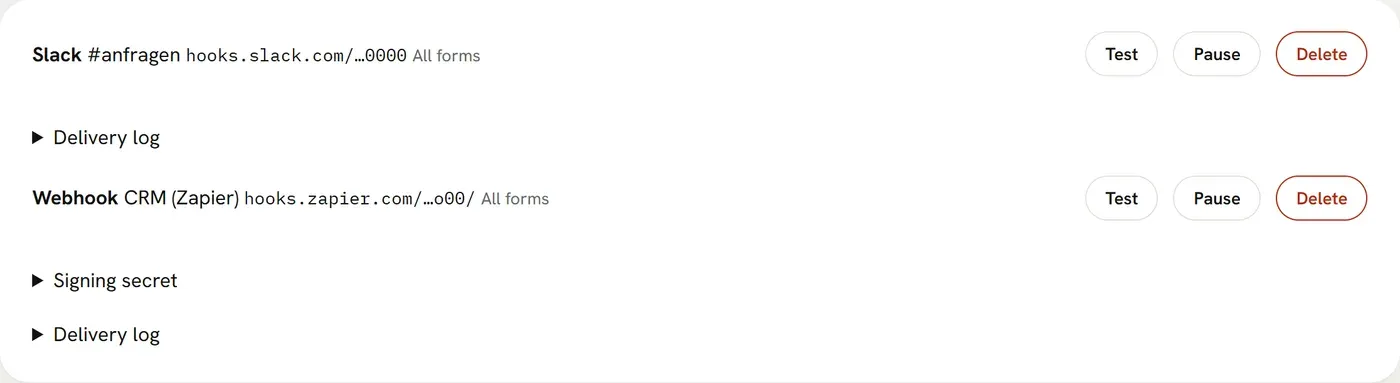
Under Integrations you send every submission to Slack, Discord, Telegram or your own URL as well. This works for a single form or as the default for all forms of a website. For Slack and Discord, enter the webhook URL from their settings; for Telegram, the bot token from @BotFather and the chat ID.
If the target does not answer with 2xx, we retry after 1, 5 and 30 minutes and after 2 and 6 hours, so six attempts in about nine hours. Each integration has a log of the last 30 days. You can resend failed deliveries from there for 7 days; we keep the content encrypted that long, even if the form stores nothing. “Test” sends a sample submission.
Slack, Discord and Telegram are outside the EU. When you connect them, you pass the submissions on to these providers yourself. Name them in your privacy policy and sign a separate DPA with them.
Webhook
A webhook receives every submission as JSON via POST: { event: "submission.created", created_at, form: { id, name }, data, files }. It also gets the headers Mailiy-Event, Mailiy-Delivery (a unique ID that stays the same on retries) and Mailiy-Signature. Only HTTPS targets with public IPs are allowed, redirects are not followed, timeout 10 seconds.
Mailiy-Signature looks like t=1767225600,v1=… where v1 is the HMAC-SHA256 of “t.body” keyed with the secret (whsec_…) shown with the webhook in the dashboard. To check it in Node:
import { createHmac, timingSafeEqual } from "node:crypto";

// header: Mailiy-Signature, body: the raw request body as a string
const [t, v1] = header.split(",").map((part) => part.split("=")[1]);
const expected = createHmac("sha256", secret).update(`${t}.${body}`).digest("hex");
const valid =
  v1.length === expected.length &&
  timingSafeEqual(Buffer.from(v1), Buffer.from(expected)) &&
  Date.now() / 1000 - Number(t) < 300;
Zapier, Make, n8n
Create a webhook trigger there (Zapier: Webhooks by Zapier → Catch Hook, Make: Custom webhook, n8n: Webhook node with POST), copy the URL and add it in Mailiy as a webhook. “Test” sends a sample submission the service can read the fields from.
Google Sheets
Open the sheet, then Extensions → Apps Script, and paste this code. Under Deploy → New deployment, choose “Web app”, “Execute as: me” and “Who has access: Anyone”. Add the web app URL in Mailiy as a webhook. Every submission becomes a new row.
function doPost(e) {
  const event = JSON.parse(e.postData.contents);
  SpreadsheetApp.getActiveSheet().appendRow([
    event.created_at,
    event.form.name,
    ...Object.values(event.data),
  ]);
  return ContentService.createTextOutput("ok");
}
Need another service? You can request it under Integrations.